
My Blog

Artstun.com

Image Splitter by height and width

Image Splitter

Image Splitter (Width × Height)

Drag & drop image here, or click to browse

Processing: 0%

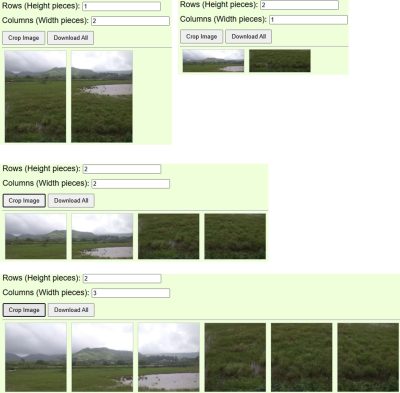
Example

Image before split

Image before crop

Image after split

After image crop

Upload Image and Split It into Multiple Pieces by Height and Width

Upload Image and Split It into Multiple Pieces by Height and Width Smart Image Splitting Made Easy with Grid-Based Splitting

In today’s digital and print world, images are rarely used as a single piece. From canvas panel prints, photo frames, posters, banners, to social media grids, there is a growing need to split one image into multiple equal parts.

An Upload Image and Split into Multiple Pieces tool allows users to divide any image into a specific number of rows (height) and columns (width) — creating perfectly aligned image segments instantly.

This guide explains what grid-based image splitting is, why it’s useful, and how to use it efficiently for professional and creative purposes.

What Is Grid-Based Image splitting?

Grid-based image splittiing is a technique where a single image is divided into multiple equal sections based on:

  • Height (rows)

  • Width (columns)

For example:

  • 2 × 2 → 4 equal pieces

  • 3 × 3 → 9 equal pieces

  • 3 × 4 → 12 equal pieces

Each splitted piece retains the original image quality and alignment.

This method is also called:

  • Image splitter

  • Image grid cropper

  • Image panel cutter

  • Multi-piece image crop tool

Why Split an Image into Multiple Pieces?

1. Canvas & Wall Panel Printing

Many modern wall artworks use diptych, triptych, or multi-panel layouts. Splitting an image into exact grid sizes ensures:

  • Perfect continuity across panels

  • No distortion during printing

  • Professional gallery-style results

2. Photo Framing & Printing

Frame businesses require accurate segmentation of images for:

  • Custom frame sets

  • Large image mosaics

  • Collage layouts

3. Social Media Grid Posts

Instagram and other platforms use grid layouts. Splitting an image helps create:

  • Scroll-stopping grid designs

  • Seamless profile aesthetics

  • Brand storytelling visuals

4. Web Design & UI Layouts

Designers often split images for:

  • Website banners

  • Background tiles

  • Responsive layouts

How Upload & Split by Height and Width Works

The process is simple and user-friendly:

Step 1: Upload Your Image

Upload any image format such as:

  • JPG

  • PNG

  • WEBP

Step 2: Enter Height and Width Pieces

Specify:

  • Number of rows (vertical splits)

  • Number of columns (horizontal splits)

Example:

  • Rows: 3

  • Columns: 4
    ➡ Result: 12 splitted images

Step 3: Automatic Splitting

The tool automatically:

  • Calculates equal dimensions

  • Splits the image precisely

  • Maintains original resolution

Step 4: Preview & Download

  • Preview each splitted piece

  • Download individually or

  • Download all images at once in a ZIP file

Benefits of Using an Online Image Splitting Tool

✔ No software installation
✔ Works directly in the browser
✔ High-quality output
✔ Accurate grid alignment
✔ Fast and secure
✔ Ideal for both print and digital use

Unlike traditional photo editing software, online grid splitting tools are faster, simpler, and more accessible.

Who Can Use This Image Splitting Tool?

  • Artists & painters

  • Photographers

  • Frame manufacturers

  • Print shops

  • Interior designers

  • Social media managers

  • Website designers

  • E-commerce sellers

Best Practices for Splitting Images into Multiple Pieces

  • Use high-resolution images for print

  • Ensure the image dimensions divide evenly

  • Preview all pieces before downloading

  • Use consistent DPI (300 DPI for printing)

  • Name files systematically (Panel_1, Panel_2, etc.)

Frequently Asked Questions (FAQ)

Can I split images into unequal sizes?

Most grid splitters create equal pieces. For custom sizes, advanced tools are required.

Will image quality reduce?

No. Splitting does not reduce quality if the original image resolution is high.

Can I split images on mobile?

Yes, browser-based tools work on both desktop and mobile devices.

Is this suitable for printing?

Absolutely. Grid splitting is ideal for prints, triptychs, and wall art set

Page Views

...

Scroll to Top